

Neovim
Highlight the scripts embedded in mise.toml and the metadata comments in file tasks with Treesitter, then add language-server features to embedded scripts with otter.nvim.
添加查询之前,请安装 toml、bash 以及你使用的任何注入语言的 Treesitter 解析器(例如用于 #USAGE 的 kdl)。通过你的 Neovim 配置启用 Treesitter 高亮。查询文件本身不会安装解析器或启动高亮;请参阅 Neovim 的 Treesitter 文档。
下面的路径均相对于 stdpath("config"),通常为 ~/.config/nvim。Lua 插件声明假设你已经在使用 lazy.nvim。
语法高亮
运行命令
Use Treesitter to highlight the code in the run commands of your mise files. The screenshot shows the result:
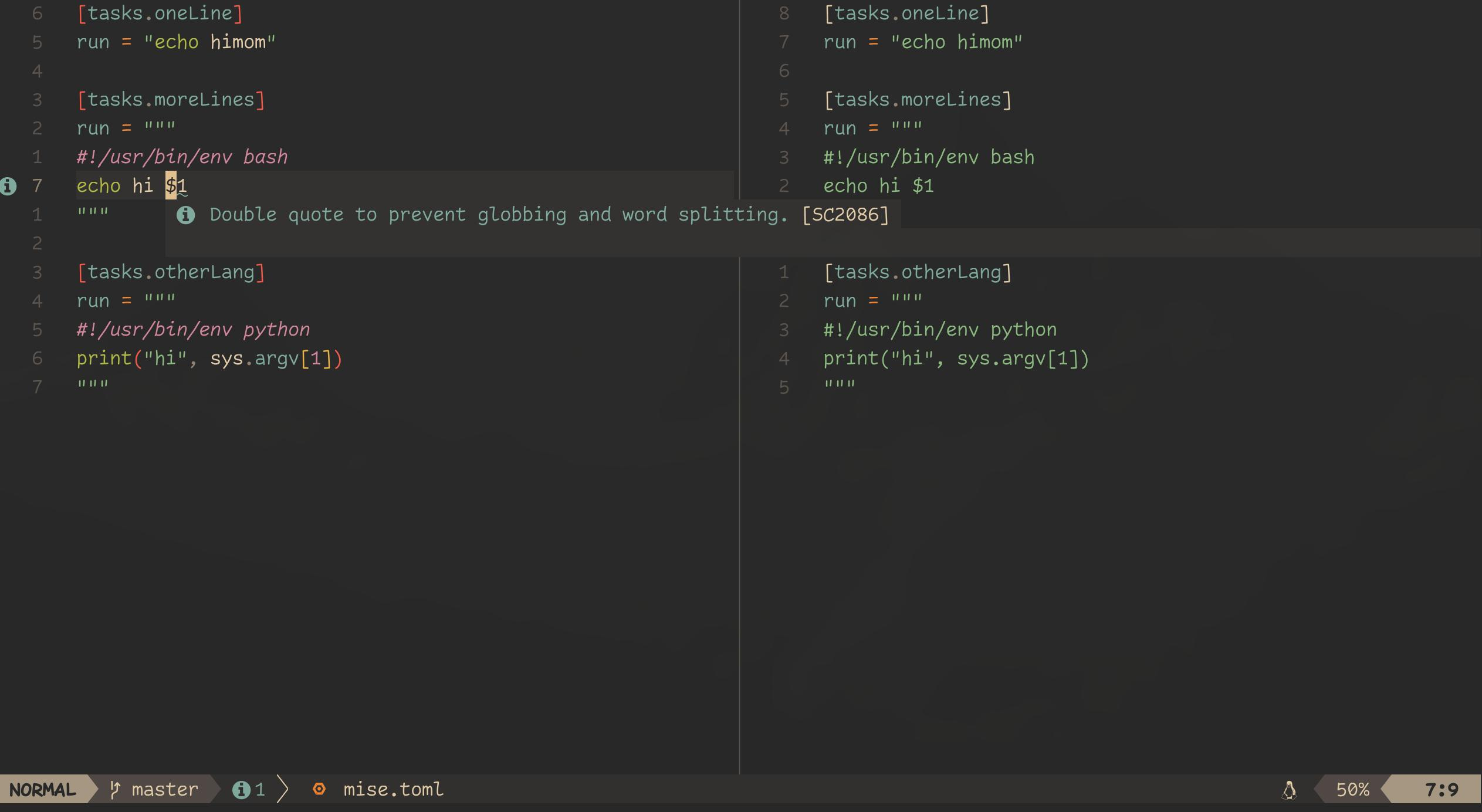
在你的 Neovim 配置中,创建一个 after/queries/toml/injections.scm 文件,并加入以下查询:
; 扩展

(pair
  (bare_key) @key (#eq? @key "run")
  (string) @injection.content @injection.language

  (#is-mise?)
  (#match? @injection.language "^['\"]{3}\n*#!(/\\w+)+/env\\s+\\w+") ; 使用 env 的多行 shebang
  (#gsub! @injection.language "^.*#!/.*/env%s+([^%s]+).*" "%1") ; 提取语言
  (#offset! @injection.content 0 3 0 -3) ; 去掉引号
)

(pair
  (bare_key) @key (#eq? @key "run")
  (string) @injection.content @injection.language

  (#is-mise?)
  (#match? @injection.language "^['\"]{3}\n*#!(/\\w+)+\s*\n") ; 多行 shebang
  (#gsub! @injection.language "^.*#!/.*/([^/%s]+).*" "%1") ; 提取语言
  (#offset! @injection.content 0 3 0 -3) ; 去掉引号
)

(pair
  (bare_key) @key (#eq? @key "run")
  (string) @injection.content

  (#is-mise?)
  (#match? @injection.content "^['\"]{3}\n*.*") ; 多行
  (#not-match? @injection.content "^['\"]{3}\n*#!") ; 无 shebang
  (#offset! @injection.content 0 3 0 -3) ; 去掉引号
  (#set! injection.language "bash") ; 默认为 bash
)

(pair
  (bare_key) @key (#eq? @key "run")
  (string) @injection.content

  (#is-mise?)
  (#not-match? @injection.content "^['\"]{3}") ; 非多行
  (#offset! @injection.content 0 1 0 -1) ; 去掉引号
  (#set! injection.language "bash") ; 默认为 bash
)
The is-mise? predicate restricts the highlighting to mise files instead of all TOML files. If you do not need this distinction, remove the lines containing (#is-mise?). Otherwise, define the predicate in your Neovim config, for example with lazy.nvim:
{
  "nvim-treesitter/nvim-treesitter",
  init = function()
    require("vim.treesitter.query").add_predicate("is-mise?", function(_, _, bufnr, _)
      local filepath = vim.fs.normalize(vim.api.nvim_buf_get_name(tonumber(bufnr) or 0))
      local filename = vim.fn.fnamemodify(filepath, ":t")
      return filename:match("^%.?mise.*%.toml$") ~= nil
        or filepath:match("/%.?mise/config%.toml$") ~= nil
        or filepath:match("/%.?mise/config%.local%.toml$") ~= nil
        or filepath:match("/%.?mise/config%.[^/]+%.toml$") ~= nil
        or filepath:match("/%.config/mise/mise%.toml$") ~= nil
        or filepath:match("/%.config/mise/mise%.local%.toml$") ~= nil
        or filepath:match("/%.?mise/conf%.d/[^/]+%.toml$") ~= nil
    end, { force = true, all = false })
  end,
},
此谓词可以识别以 mise 命名的文件以及 .config/mise/config.toml 之类的分组配置文件。如果你的项目使用自定义配置文件名,请相应调整该谓词。
shebang 查询会处理直接解释器路径和 /usr/bin/env <name>。提取出的名称必须与已安装的 Treesitter 语言匹配;env -S uv run 之类的包装器以及 python3 之类的带版本名称需要自定义映射或查询。Bash 回退只控制高亮;mise 实际使用的默认 shell 在 TOML tasks 中有说明。
#MISE and #USAGE comments in file tasks
Treesitter can also highlight the #MISE and #USAGE comments in file tasks. The screenshot shows the result:

在你的 Neovim 配置中,创建一个 after/queries/bash/injections.scm 文件,并加入以下查询:
; 扩展

; ============================================================================
; #MISE 注释 - TOML 注入
; ============================================================================
; This injection captures comment lines starting with "#MISE ", "# MISE ",
; "#[MISE] " or "# [MISE] " and treats them as TOML code blocks for syntax
; highlighting.
;
; #MISE 格式
; (#offset!) 指令会从源码中跳过 "#MISE " 前缀(6 个字符)
((comment) @injection.content
  (#lua-match? @injection.content "^#MISE ")
  (#offset! @injection.content 0 6 0 1)
  (#set! injection.language "toml"))

; # MISE format
((comment) @injection.content
  (#lua-match? @injection.content "^# MISE ")
  (#offset! @injection.content 0 7 0 1)
  (#set! injection.language "toml"))

; #[MISE] format
((comment) @injection.content
  (#lua-match? @injection.content "^#%[MISE%] ")
  (#offset! @injection.content 0 8 0 1)
  (#set! injection.language "toml"))

; # [MISE] 格式
((comment) @injection.content
  (#lua-match? @injection.content "^# %[MISE%] ")
  (#offset! @injection.content 0 9 0 1)
  (#set! injection.language "toml"))

; ============================================================================
; #USAGE 注释 - KDL 注入
; ============================================================================
; This injection captures consecutive comment lines starting with "#USAGE ",
; "# USAGE ", "#[USAGE] " or "# [USAGE] " and treats them as a single KDL code
; block for syntax highlighting.
;
; #USAGE 格式
((comment) @injection.content
  (#lua-match? @injection.content "^#USAGE ")
  ; 将范围向右扩展一个字节,以包含末尾换行符。
  ; 参见 https://github.com/neovim/neovim/discussions/36669#discussioncomment-15054154
  (#offset! @injection.content 0 7 0 1)
  (#set! injection.combined)
  (#set! injection.language "kdl"))

; # USAGE format
((comment) @injection.content
  (#lua-match? @injection.content "^# USAGE ")
  (#offset! @injection.content 0 8 0 1)
  (#set! injection.combined)
  (#set! injection.language "kdl"))

; #[USAGE] format
((comment) @injection.content
  (#lua-match? @injection.content "^#%[USAGE%] ")
  (#offset! @injection.content 0 9 0 1)
  (#set! injection.combined)
  (#set! injection.language "kdl"))

; # [USAGE] 格式
((comment) @injection.content
  (#lua-match? @injection.content "^# %[USAGE%] ")
  (#offset! @injection.content 0 10 0 1)
  (#set! injection.combined)
  (#set! injection.language "kdl"))
These combined injections work on Neovim 0.11 and 0.12. Neovim 0.12 also accepts a multi-node pattern, ((comment)+ @injection.content ...), without injection.combined. That pattern requires every comment in a run of consecutive comments to match, so it does not highlight a #USAGE block that directly follows the shebang or a #MISE line, and Neovim 0.11 and earlier reject it with an #offset! error.
The same queries work with other grammars that represent # comments as comment nodes. Use :InspectTree to check the node names in your parser. Treesitter injections are per language, so add the queries to each language's query file. For example, put them in after/queries/python/injections.scm to enable them for Python as well as Bash.
For languages with // comments, such as JavaScript, create after/queries/javascript/injections.scm with:
; extends

((comment) @injection.content
  (#lua-match? @injection.content "^//MISE ")
  (#offset! @injection.content 0 7 0 1)
  (#set! injection.language "toml"))
((comment) @injection.content
  (#lua-match? @injection.content "^// MISE ")
  (#offset! @injection.content 0 8 0 1)
  (#set! injection.language "toml"))
((comment) @injection.content
  (#lua-match? @injection.content "^//%[MISE%] ")
  (#offset! @injection.content 0 9 0 1)
  (#set! injection.language "toml"))
((comment) @injection.content
  (#lua-match? @injection.content "^// %[MISE%] ")
  (#offset! @injection.content 0 10 0 1)
  (#set! injection.language "toml"))
((comment) @injection.content
  (#lua-match? @injection.content "^//USAGE ")
  (#offset! @injection.content 0 8 0 1)
  (#set! injection.combined)
  (#set! injection.language "kdl"))
((comment) @injection.content
  (#lua-match? @injection.content "^// USAGE ")
  (#offset! @injection.content 0 9 0 1)
  (#set! injection.combined)
  (#set! injection.language "kdl"))
((comment) @injection.content
  (#lua-match? @injection.content "^//%[USAGE%] ")
  (#offset! @injection.content 0 10 0 1)
  (#set! injection.combined)
  (#set! injection.language "kdl"))
((comment) @injection.content
  (#lua-match? @injection.content "^// %[USAGE%] ")
  (#offset! @injection.content 0 11 0 1)
  (#set! injection.combined)
  (#set! injection.language "kdl"))
Keep the ; extends line. Without it, Neovim uses only the first injections.scm on runtimepath, and after/ directories come last, so your file is ignored whenever Neovim or a plugin already provides injections for that language. To replace the bundled queries instead, put the file in ~/.config/nvim/queries/<lang>/ (not after/) and leave out ; extends.
Add LSP features to embedded scripts
Use otter.nvim to enable LSP features and code completion for code embedded in your mise files. With lazy.nvim:
{
  "jmbuhr/otter.nvim",
  dependencies = {
    "nvim-treesitter/nvim-treesitter",
  },
  config = function()
    vim.api.nvim_create_autocmd({ "FileType" }, {
      pattern = { "toml" },
      group = vim.api.nvim_create_augroup("EmbedToml", {}),
      callback = function()
        require("otter").activate()
      end,
    })
  end,
},
This activates otter in every TOML buffer. To limit it to mise files, check the buffer name with the same patterns as the is-mise? predicate before calling activate().
otter.nvim needs both the injection queries and a configured language server for each embedded language. It creates the embedded buffers and routes requests; it does not install the language servers. See otter.nvim's setup guide.
故障排除
- 运行
:checkhealth vim.treesitter检查解析器是否可用。 - 使用
:InspectTree确认 TOML 的run值或文件任务注释是否匹配查询的节点类型。这些查询涵盖字符串形式的run值;任务数组和run_windows需要额外的模式。 - 如果谓词未知,请在打开文件之前加载 Lua 注册代码,或者删除
(#is-mise?),以将查询应用于所有 TOML 文件。 - 如果高亮有效但 LSP 功能不起作用,请先确认同一个语言服务器在普通文件中可以正常工作,再调试嵌入缓冲区。